Judge hosts
Distributed and scalable, for automatic judging.
Dictionary: Jitendex
I am Vijay Ragav, a software engineer and entrepreneur.
From an early age, I developed a strong curiosity for mathematics and science, which naturally led me to pursue a B.E. in Computer Science and Engineering. As the first graduate in my family, receiving scholarship support made my college education possible and shaped my academic journey.
My goal is to become a global leader who uses technology to solve social problems and improve access to education, especially for children from poor families. I hope to build useful products that benefit people around the world.
A camera on the factory floor watches a custom car being built, and a CNN model tells the customer which stage it has reached.
Read the case studyA coding contest system we set up and ran for our college, with an AI bot that sends a team a hint when their solution is wrong.
Read the case studyA hackathon prototype that makes a digital fingerprint of an image, so people can check it against the version a trusted source registered.
Read the case studyAn English dictionary that writes each word’s pronunciation in Tamil letters, built by our startup VR INNOVATES to help Tamil speakers with English.
Read the case studyA minimal Windows tool for typing Hiragana and Katakana directly from romaji, without Kanji conversion.
Read the case studyImage-based order tracking for people who are having a car custom built, and what we learned when we took it to industry experts.
People who order a custom car, not a mass-produced one, wait a long time and rarely know where their car is. A camera at the factory sees the car being built, and an AI model tells which of five stages it is in: engine production, welding, painting, assembly line and quality control. The customer follows that on a website.
We built it as an internship project at the ZF Center of Advanced Data Analytics at my college, Rajalakshmi Institute of Technology, where industry professionals guided student teams. I led our team of three, with Chinnathambi and Sowlexna Varsha. I did this project in my third year of college, and I was also the ambassador of that center.
We researched customer order tracking and how cars are made. Along the way we listed the stages a tracking journey could show: stamping, body assembly, painting, component installation, quality inspection and final assembly. I also read papers on why customers want order updates and how tracking can expose progress through production. A selection of what I read is under Selected background reading below.
I first tried Google’s Teachable Machine on a small dataset to check that the idea would work. Then we collected our own dataset and trained a Convolutional Neural Network (CNN) in TensorFlow and Keras. I trained it on my HP Victus laptop, which has an NVIDIA RTX 3050 graphics card, and I used CUDA so the training ran on that GPU and finished faster.
For each of the five stages, in build order: engine production, welding, painting, assembly line and quality control, we used about 2,500 training images and about 500 test images. That is roughly 12,500 training images and 2,500 test images in total.
We collected about 14 GB of vehicle manufacturing photos. The model trained for 30 epochs and scored 97.03% on the test split. Here are nine samples, one or two per stage in the same order.
We built the customer and vendor sides with Flask and MongoDB. A customer enters an order ID and sees their order summary: vehicle details, VIN, expected delivery date and price breakdown. A vendor sees all orders in a table and can edit a vehicle’s colour, expected delivery date and tracking status. We also added email sending with Python’s smtplib and MIME libraries.
Editing the tracking status in the vendor view is an extra feature. The website uses the same database as the model and the live camera feed.
We showed the live feed system to ZF representatives. They advised us to focus on repair problems.
We went back and looked honestly at what we had. It was a prototype, and getting the data for it was the hard part:
So we did not take it further. Even so, the work we did let us present the project to ZF and finish the internship. Along the way I learned how to collect a dataset, train and test an image classifier, build a customer-facing web app, and check an idea against real constraints before building more of it.
I read many papers on the subject. These two are the ones that matched our work most closely.
Image credits: Some images used on this website are sourced from third-party creators and are used for demonstration purposes. All rights belong to their respective owners.
A coding contest system we set up and ran for our college, and an AI bot I built that gives a team a hint when their solution is wrong.
I did this project in my third year of college. I was the leader of the technical club, and I thought we could hold a coding contest. Then we saw that the programming sites that run contests cost money. We are computer science students, so we decided to find our own way instead of paying for one.
We chose DOMjudge, an open-source system for running programming contests, and set it up ourselves. Then we customised it to our college’s needs. Our aim was a configurable, self-hosted contest management system that helps students prepare for technical interviews at top tech companies.
Everything runs on one CMS server. DOMjudge runs inside a Docker container, with a MySQL database next to it. Judge hosts are separate machines that judge the submissions automatically. The admin and jury members manage the contest from their own computers, and participants open the contest website in a browser through the server’s IP address.
Distributed and scalable, for automatic judging.
Simple and portable.
Easy to add languages, compilers and validators.
Submissions, judgings, diffs, rejudging, clarifications and resubmission.
We held it as a DSA (data structures and algorithms) competition in our lab, to improve students’ coding skills. The contest site carried our event banner and the college logo. Participants could not open other websites during the contest: Windows Defender Firewall blocked them, and a script built by RIT students set it up on every computer.
This is the part I built. A wrong verdict tells a student that something is wrong, but not what. Our idea was that practice is not complete without feedback, so I added a bot to DOMjudge that picks up every submission that is not accepted and sends the team a hint that guides them toward the correct solution, without giving the full answer away.
The four steps of the bot, in order.
Checks DOMjudge for new judgements every 10 seconds.
Only those with a non-accepted verdict.
Fetches the source code, team ID and problem ID through DOMjudge’s API. The code arrives Base64-encoded and the bot decodes it.
A Python questions dictionary maps each problem ID to its description, which goes to the model as context.
One-shot prompting: an example problem, wrong answer and hint, then the student’s problem and submission.
A brief, step-by-step hint that encourages the student to investigate, without revealing the full answer.
The hint is posted back to DOMjudge as a clarification for that team.
API calls, errors and generated hints go to a log file, app.log.
Docker-based, with Llama 3.2 loaded through ollama pull. Dockerfiles cover plain Python, GPU machines and a preloaded model.
The model runs on our own machine through Ollama, so we need no paid AI service, in the same spirit as the whole project. Each team gets only a small number of AI hints in each contest.
To test it, I submitted a partially correct solution for the problem “Float special compare test”. The bot read the incomplete solution and sent this clarification to the team.
I conducted the competition in our lab, on the system above.
Here are the problems we put on the contest website, as an example of what a problem looks like in DOMjudge. There are four, A to D. Each one has its problem statement as a PDF, its DOMjudge settings and its test data, and problem A also has an output validator.
We registered the project for copyright as “AI Powered Contest Management System”, a work of computer software. The diary number is 37165/2024-CO/SW.
This was a team effort. Thank you to the people who worked on it with me:
Thank you also to my professor, Ms. A. G. Noorul Julaiha, Assistant Professor, Center of Advanced Data Analytics, Department of Computer Science and Engineering, Rajalakshmi Institute of Technology.
A hackathon prototype for checking whether an image matches the version a trusted source registered. We built it as Team Heisenberg in a 24-hour sprint at HackVyuha’25.
Images can be copied, edited and shared again without their original context. We explored a simple provenance flow: a trusted source registers an image and some context, and then another person can submit a copy and check whether it matches the registered version.
Could a cryptographic fingerprint and a shared record make it easier to check whether an image file has changed since it was registered?
A registration and verification journey that a user can follow, connected to a smart contract on a local development blockchain.
The five steps of a check, in order.
The project repository describes a React frontend, a Flask and Web3.py backend, a Solidity smart contract and a local Hardhat blockchain. Our demo focused on the image registration and verification journey.
The demo was a smaller piece of the broader system we proposed to the judges. It is described further down this page.
I was mainly responsible for the React frontend and the interface. I shaped how a person selects an image, adds details, registers it and checks it. I also took part in the team’s discussions as we developed the idea and worked out how to explain the flow.
It was a team build. We brought the interface, backend, smart contract, integration and presentation together as a team.
HackVyuha’25 began with an online proposal round. Teams explained the problem, solution, technical stack and expected outcomes. Shortlisted teams then travelled to SRM University–AP near Vijayawada for the on-campus hackathon.
Our team was HEISENBERG: Senthamizhan, Vijay Ragav R, Salai Saidhanyan, Risha Shri and Sujan. The hackathon was a 24-hour sprint. We spent the day coding and building without sleep, and still found time to enjoy the campus and the event together.
We also attended a session on 29 May 2025 by Dr. CSR Prabhu, former Director General of NIC, on “Recent Trends in Deep Learning Methods and Applications”, as part of the hackathon process.
I had a lot of fun being there with my friends. I remember going around without knowing Telugu, enjoying the biryani, and having a comfortable hostel room to return to. We talked late into the night, watched the dance performances, and found the SRM organizers friendly and welcoming. The project mattered, but so did the experience of travelling together and sharing the whole event.
We also took home some goodies, like stickers and our ID cards. I did not take any photos of them, and I wish I had.
For the proposal round, we presented a broader system around the registration flow shown in the demo:
A journalist or approved photographer captures an image through a trusted app or device, with photographer ID, timestamp and location.
The proposal included storing the image through IPFS and keeping its fingerprint and relevant metadata in a blockchain record.
Readers, journalists and fact-checkers could submit an image and compare it with a previously registered record.
We also imagined connections to newsroom tools, mobile capture and, eventually, camera-based workflows.
A dictionary that writes how an English word sounds in Tamil letters, built by our startup VR INNOVATES.
Many Tamil speakers find English pronunciation hard. Many English sounds are not native to Tamil, so a word is easy to read and still hard to say.
Dictionaries show pronunciation in the International Phonetic Alphabet (IPA). To use it, a learner first has to learn a whole new set of symbols, which is a lot to ask when the goal is to learn English.
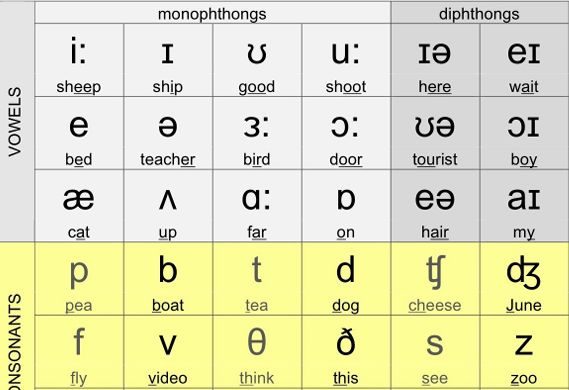
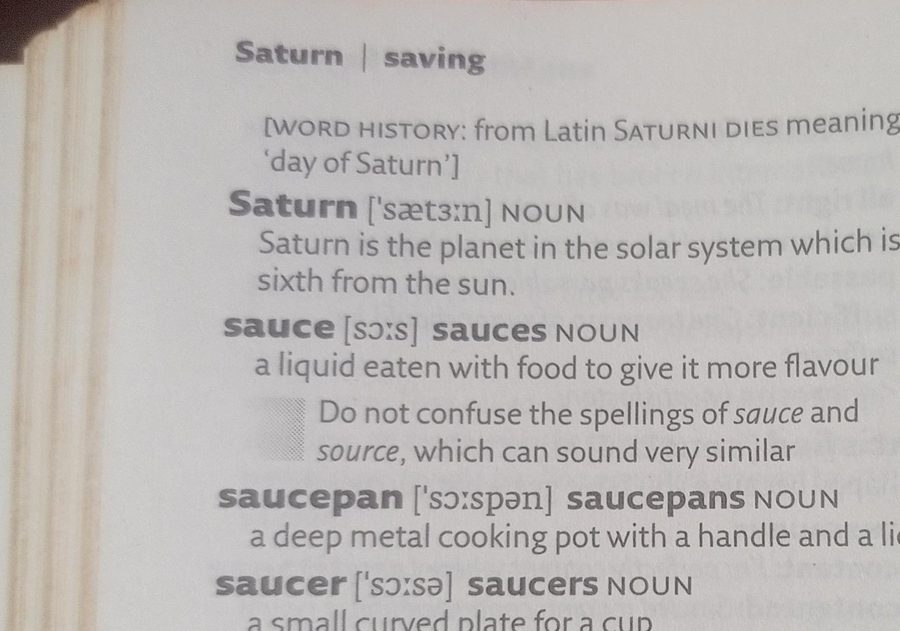
To solve this, we started VR INNOVATES and registered it on the Udyam website. Many people already read Tamil, so we used Tamil letters to show English sounds. We called the system the Tamil Pronunciation Alphabet, or TPA.
In Tamil, a consonant and a vowel join to make a new sound, for example க் + இ = கி. TPA does the same with English consonants and Tamil vowels. For a sound Tamil has no separate letter for, such as f, b or d, we keep the English letter and join it with a Tamil vowel, for example f + அ = fஅ.
[ஸாஸ்]
[ஸன்]
[fஅன்]
[bஒட்]
[fரீக்]
[fஆல்ட்]
[லிஸ்ன்]
[அdவான்டிஜ்]
Each word has its Tamil translation, its pronunciation in both IPA and TPA, and its meanings in English and in Tamil. Users can search for a word or tap Random to get one, and the app keeps their recent searches. Tap a screenshot to see it larger.
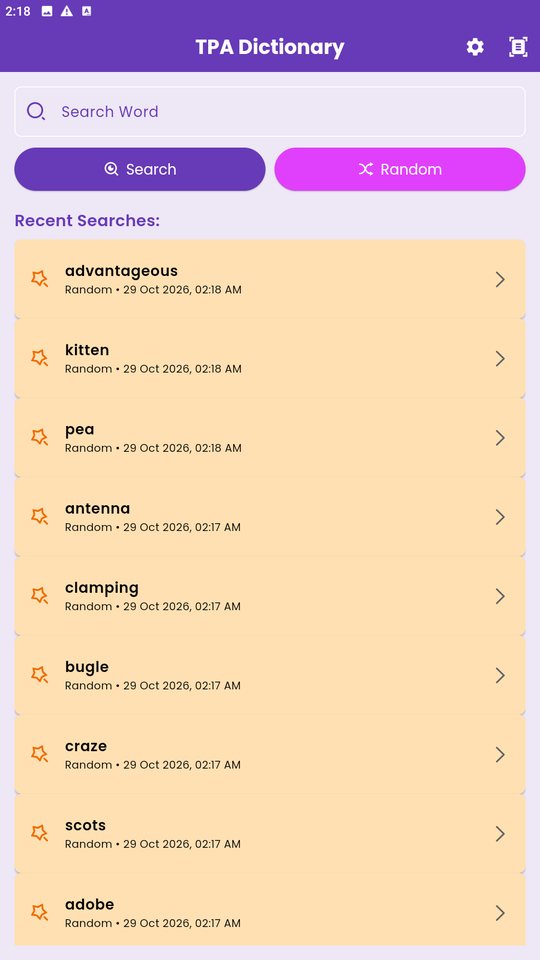
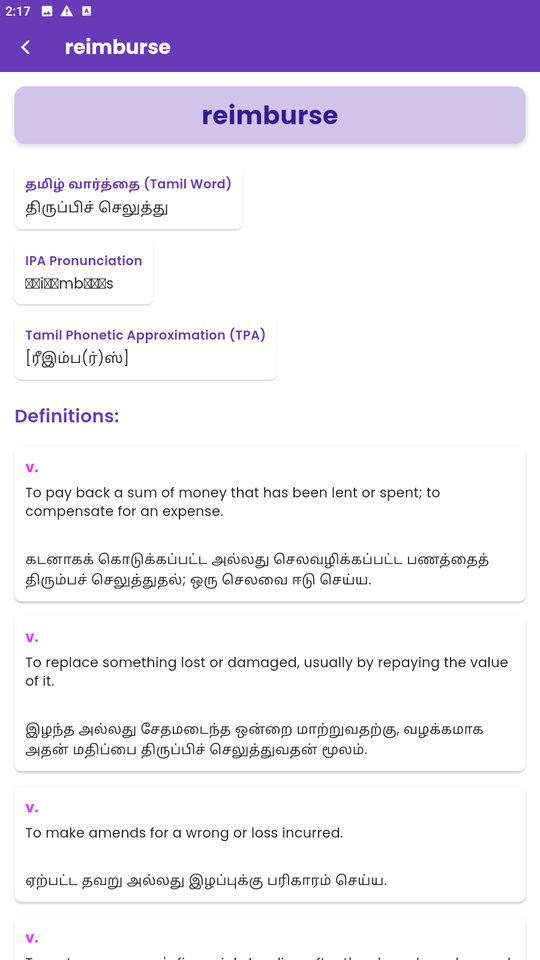
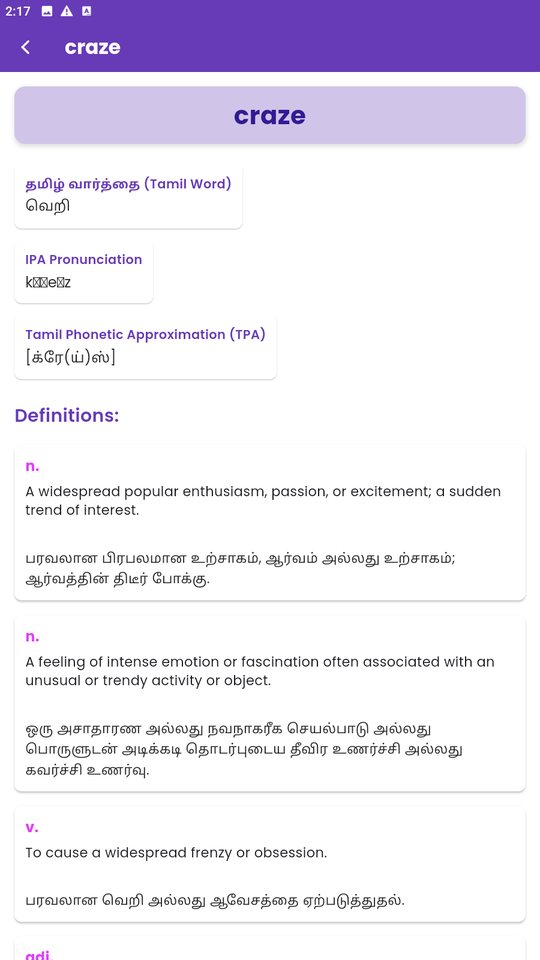
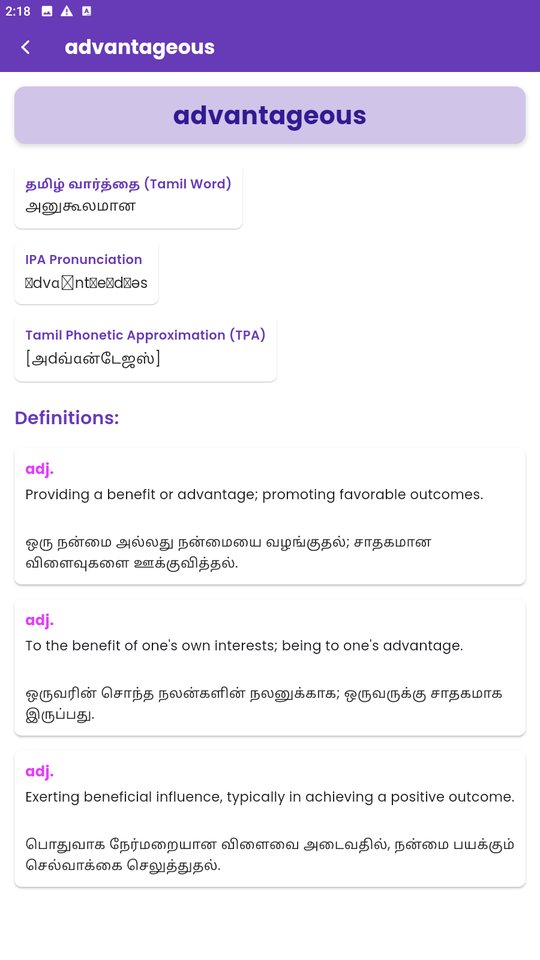
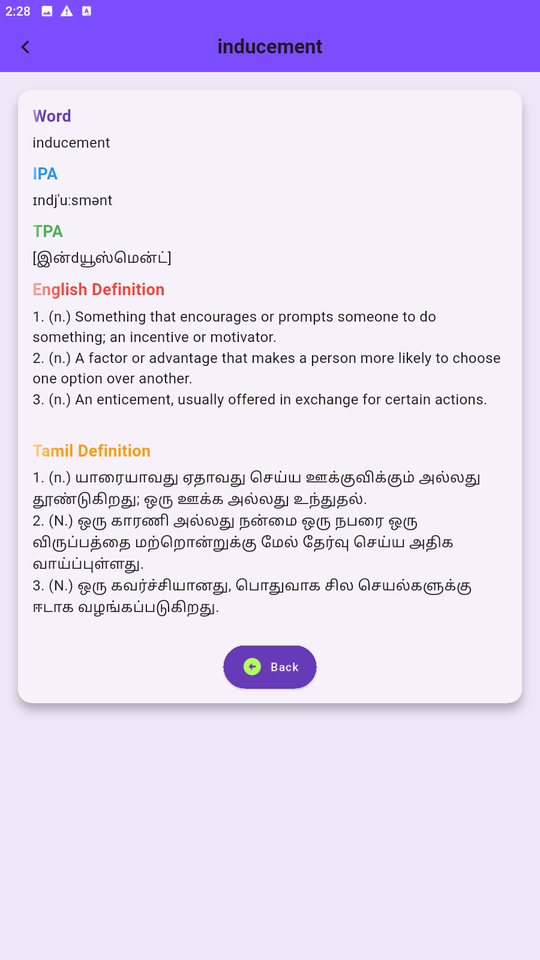
About 15,000 English words, each with its TPA pronunciation. We generated the entries with LLMs.
Open-source Gemma 2B-Instruct (Q5_K_M), and the Gemini 2.0 Pro and OpenAI GPT-4 APIs.
An Android app built with Flutter, a website with Flask and MongoDB, and a static website on GitHub Pages.
School and college students, government job aspirants, and English learners from rural areas, especially students in government schools. We planned to offer it free in a mobile app. It fits the UN Sustainable Development Goal 4, quality education for all.
The closest tool most learners use is Google Translate, which gives only a basic pronunciation. Ours writes the sounds in the script they already read.
We presented this project as a team in several places.
We presented for Voucher 2. We were hoping for funding from the Tamil Nadu government, but we were rejected.
At IKP Knowledge Park, HICC, Hyderabad, on 27 October 2025.
At our college, Rajalakshmi Institute of Technology.
We conducted the trial to explore whether students and teachers could understand and use TPA, while we were also building the app at the same time.
The trial also surfaced accuracy issues, which we were working to address. In an early access test, three students viewed 224 words and flagged 41 of them, about 18%, as having incorrect TPA. That is a small, informal sample, so it does not give the dictionary’s overall error rate, but it is important context.
The data behind the website is open, so other programmers can use it. It has about 15,000 English words. For each word it has:
Feel free to browse, learn from, and experiment with the contents of this dataset. Attribution is appreciated and required for any public use, derivative works, or references.
One caution. Some TPA pronunciations are wrong. In our small early access test, students flagged about 18% of the words they viewed. Check the TPA before you rely on it.
Our early trial showed accuracy issues in the TPA data. For a dictionary that beginners will use, even a small share of wrong pronunciations is a big problem, and it would lose against the established dictionary companies. So in May 2026 we paused this project. We may return to it when AI gets better at knowing Tamil sounds.
We planned to expand to 1 lakh words, with similar pronunciation systems for Telugu, Malayalam and Kannada, but we abandoned those plans due to the problems described above.
A minimal Windows tool for typing Japanese Hiragana and Katakana by entering their sounds in romaji.
As a beginner learning Japanese, I wanted to type only Hiragana without dealing with Kanji or a complex input system. Standard IMEs are designed for fluent typists and keep suggesting Kanji, which interrupts simple kana practice.
The spacebar can also trigger conversion candidates or insert a full-width space. HiraganaKeyboard skips conversion: the spacebar always inserts a normal half-width space, and kana appear directly as you type.
Click the tray icon to switch between English and Japanese input. The program starts in English mode. You can also press Ctrl + Space. When Japanese Kana mode is active, the tray shows a Japanese flag icon.
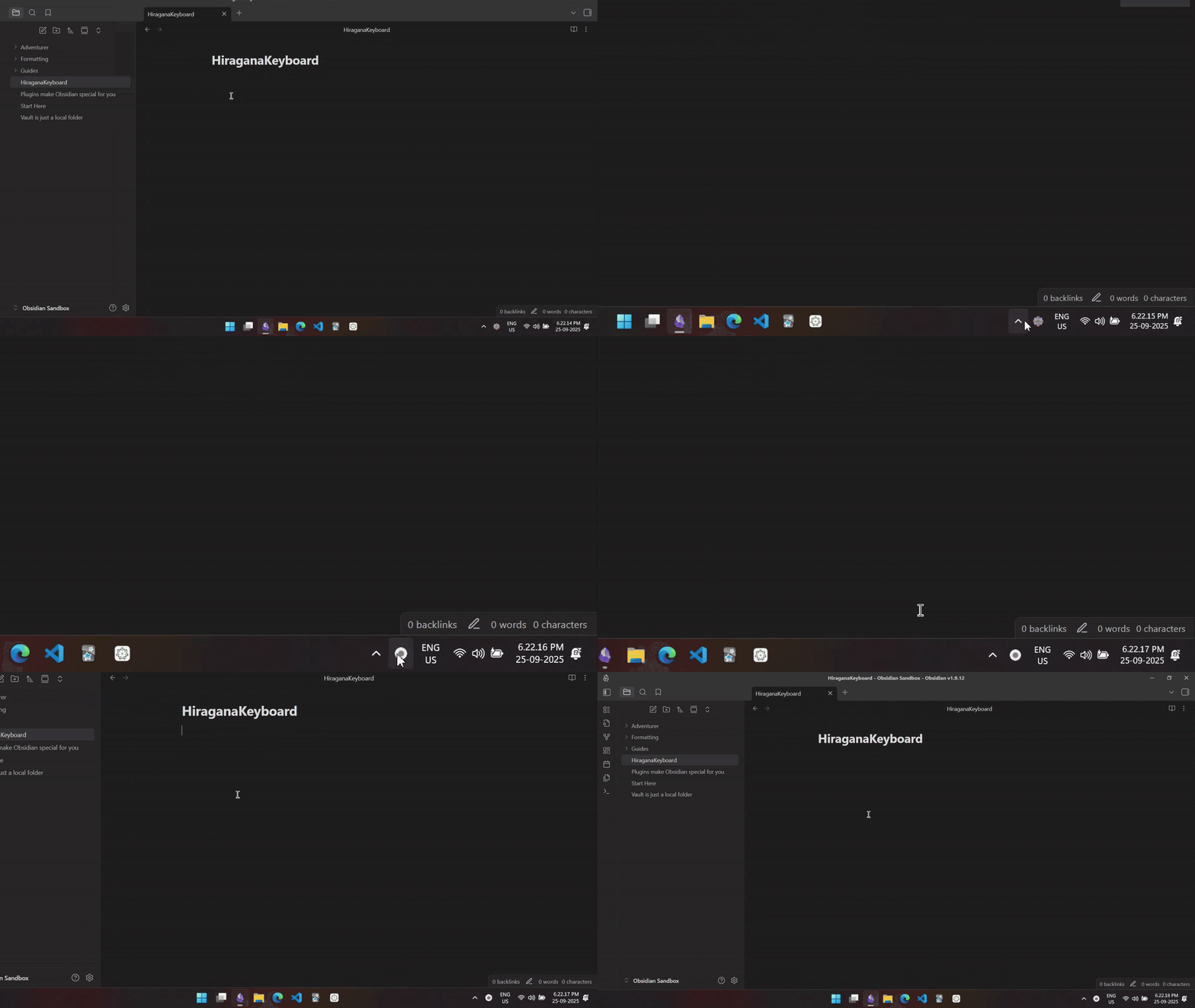
Enter the romaji for a sound and it converts directly to kana:
a → あ · ka → か · ki → きga → が · za → ざ
kko → っこgakkou → がっこうmotto → もっと
xtsu → っ · xya → ゃkyu → きゅ · kyo → きょ
Alternative spellings are supported: tsu or tu → つ, and shi or si → し. Turn on Caps Lock to type Katakana.